
Service · AI & automation

AI Automation that saves you real time every day

TeaFan Media helps companies in Germany and beyond eliminate time wasted on manual tasks like emails, data entry, follow-ups, and tool switching. We identify practical automation opportunities in your workflows and build AI solutions that connect your existing tools — instead of creating more complexity.
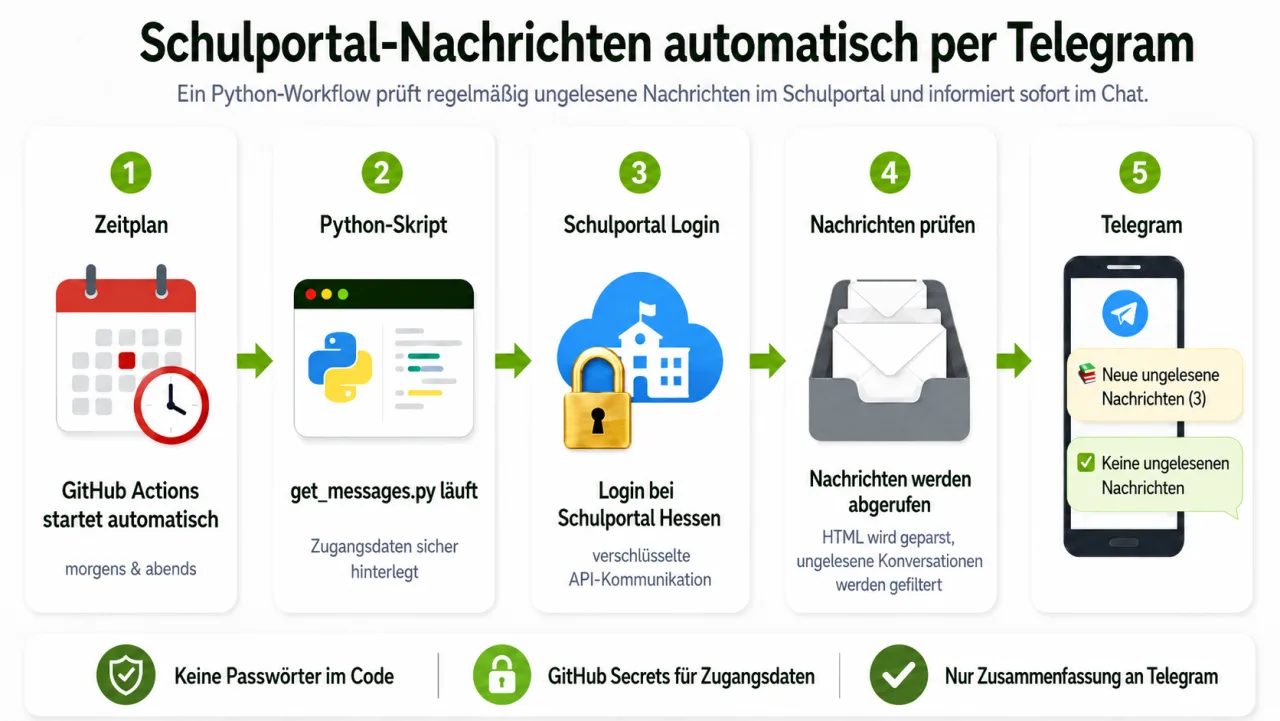
Diagramm eines Automations-Workflows von Zeitplan über Skript bis zur Chat-Benachrichtigung
Python GitHub Actions API Human Review
Example: a workflow that checks relevant messages and pushes a summary into chat.

In person – Rhine-Main area

Face-to-face meetings are always possible in and around Wiesbaden, Mainz and Frankfurt.

Remote – across Germany & worldwide

Everywhere else we collaborate smoothly online — in English or German.

Typical Use Cases

  • Your team regularly copies data between email, spreadsheets, CRM and tools.
  • Inquiries have to be read, sorted, answered or forwarded.
  • Reports, summaries or status updates are created manually again and again.
  • After meetings, follow-ups, CRM notes or quotes are left undone.
  • You know AI could help but don’t want a sprawl of tools.
  • A process lives in individual people’s heads but isn’t documented.

What you get

From analysis to ongoing operation – small, verifiable steps instead of big AI promises.

Core building blocks

Process audit

Flow, people, tools, exceptions and risks — recognising realistic automation limits.

AI-readiness check

Data quality, access, data protection and tool maturity — clarifying whether AI truly fits.

Tool & data map

Systems, interfaces, data flows and permissions — less flying blind before delivery.

Workflow blueprint

Target process, triggers, rules and control points as a clear build spec.

Prototype

A small workflow with real sample data — early validation without a big platform project.

Integration

API, n8n, Make, custom code or existing tools — automations fit your environment.

Optional add-ons

Human review

Check steps, approvals and error cases — control stays where it’s needed.

Documentation

Flow, access, maintenance and edge cases so the workflow stays comprehensible.

Training

A short onboarding for users and owners so the team can work with the system.

From audit to ongoing optimization

Three ways to work together – depending on maturity and need.

Audit

Best when
You don’t yet know where automation pays off.
Typical scope
Process analysis, prioritization and a roadmap.

Ongoing optimization

Best when
Workflows become business-critical.
Typical scope
Monitoring, adjustments and new automations.

Project Examples

Problem

Incoming inquiries must be read and sorted manually.

Approach

AI-assisted classification, extraction of key data and routing to the right place.

Outcome

Faster response and less manual groundwork.

Problem

Follow-ups are left undone after client meetings.

Approach

Meeting summary, task list and a draft follow-up email.

Outcome

Less rework and better follow-up communication.

Problem

Quotes are built from recurring information.

Approach

Structured input, a quote draft and human approval.

Outcome

Faster quotes without losing control.

Problem

Reports are regularly compiled from several sources.

Approach

Automatic data retrieval, summary and delivery to defined recipients.

Outcome

Less routine and more reliable timeliness.

How we work together

  1. 01

    Audit

    Clarify processes, bottlenecks, tools and risks – usually in 30 minutes.

  2. 02

    Blueprint

    Target process, triggers, rules and control points as a clear build spec.

  3. 03

    Prototype

    One scoped use case made testable early – low-risk and concrete.

  4. 04

    Build

    A production workflow built on your existing systems – maintainable and documented.

  5. 05

    Handover & care

    Onboarding, monitoring and – optionally – ongoing adjustments.

Frequently asked questions

What can sensibly be automated?
Recurring tasks with clear inputs, rules or decision patterns: moving data, sorting emails, preparing follow-ups, compiling reports, generating documents or summarising information.
Where is AI not the right fit?
When the process isn’t understood, data is very messy, or every decision needs real expert judgement without a recurring pattern. Then clarifying the process matters more than an AI tool.
Do we need new software?
Often not. Existing tools and interfaces are reviewed first. New software is only recommended when it genuinely simplifies the workflow or existing systems don’t allow clean integration.
How do we best start?
With one clearly scoped use case that costs noticeable time and is easy to verify. A small working workflow is worth more than a large AI roadmap without delivery.
How do you handle credentials and sensitive data?
Access is granted as narrowly as possible, ideally via separate accounts, API keys or approvals. Data protection, permissions and data flows are clarified before implementation.
What happens if an automation fails?
For relevant workflows, error cases, notifications and manual fallbacks are planned. An automation should not fail silently but stay verifiable.
Who owns the workflow after delivery?
Ownership, hosting, tool accounts and documentation are clarified up front. The goal is a clean handover, not a black box only the provider understands.
Can existing n8n, Make or Zapier workflows be improved?
Yes. An audit of existing automations is often worthwhile, because many workflows work as a demo but become unstable with real data, edge cases or changes.
Do you offer ongoing support?
Yes. When a workflow is used regularly, support makes sense: monitoring, adjustments when tools change, new build-out stages and occasional process reviews.

Where do you lose the most time today?

Describe one bottleneck – we’ll see whether automation is worth it.

Request an audit